Trustify structure
Understand how Trustify is organized so you can set it up in the way that best fits your business.
Overview
Trustify is built around four key concepts: Accounts, Organizations, Profiles, and Surveys. Each plays a distinct role and together they give you the flexibility to manage one business or many - with the right people and permissions in each.
Accounts
Every person who accesses Trustify needs a personal account. Your account is your individual identity on the platform - it is tied to your email address and should never be shared.
With one account you can:
- Access multiple organizations (for example, if you manage several businesses or have been invited to a client's organization).
- Switch between organizations without logging out.
- Maintain your own profile and notification preferences.
Keep your account personal
Never share your Trustify account credentials. If a colleague, employee, or agency needs access, invite them as a member of your organization with the appropriate permissions.
Organizations
An Organization is the central workspace for a business. Your subscription, profile pages, billing, and team members all belong to an organization - not to your personal account.
Why organizations matter
- One login, multiple businesses - if you own or manage several companies, create a separate organization for each one and switch between them from a single account.
- Team collaboration - invite employees, agencies, or partners as members. Each member gets their own account and you control what they can see and do.
- Clear billing - your subscription and invoices are tied to the organization, making it easy to manage costs per business entity.
- Agency-friendly + an agency can be invited into a client's organization to manage it on their behalf, while the client retains control over the subscription.
Profile pages
A Trustify Profile is your public reputation page. It is where customers read your reviews, see your Trustify Score, and find your business details.
Standard profiles
By default, each profile you create is a standard Trustify profile. It lets you:
- Collect new reviews from customers.
- Import reviews from external platforms (Google, Tripadvisor, etc.).
- Display all reviews on a public profile page with your branding.
- Embed review widgets on your website.
Collection (parent) profiles
A Trustify Collection Profile combines multiple standard profiles into one unified view.
This is useful when your business has several locations, brands, or regional entities that each have their own profile, but you also want to present a combined reputation for your overall company.
Example:
A hotel group operates properties in Zurich, Geneva, and Basel. Each property has its own Trustify profile. The group creates a Collection Profile that aggregates all three, which they embed on their main corporate website.
Or:
A corporation creates individual profiles for three of its product brands. A Collection Profile aggregates them all for the parent company's homepage.
When to create separate profiles
Separate profiles make sense when business areas differ by:
- Geography - different cities, regions, or countries.
- Purpose or service - distinct products or service lines with different customer audiences.
- Brand - subsidiaries or brands that are perceived independently by customers.
We recommend against creating overly granular profiles (for example, a separate profile for a newsletter). Each profile should represent an area where customers have a meaningful and independent experience.
Surveys
Trustify Surveys let you collect structured, in-depth feedback beyond a star rating. A survey is linked to one or more profiles and appears as a specific review path for customers.
When a customer leaves a review via a survey:
- You collect additional structured data about a specific area (product, location, service type, etc.).
- The profile shows a tag indicating exactly what the reviewer rated, giving visitors more transparency.
Example:
A software company has one Trustify profile but creates two surveys: one for its mobile app and one for its web platform. Customers rate via the relevant survey and the profile clearly shows "rated via Mobile App" or "rated via Web Platform", giving detailed insight into each product area.
Surveys are especially powerful when combined with the Surveys & Insights feature, which gives you analytics and response breakdowns.
Example structure
Here is how Trustify's structure might look for a mid-sized company:
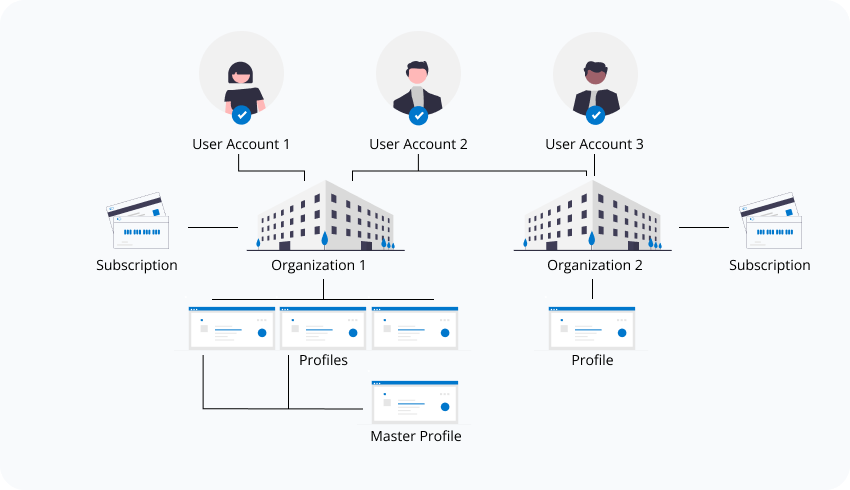
| Level | Example |
|---|---|
| Account | [email protected] (personal login) |
| Organization | Company GmbH (subscription lives here) |
| Standard Profiles | Zurich Office, Berlin Office |
| Collection Profile | Company GmbH (aggregates both) |
| Surveys | Product A Feedback, Product B Feedback |
Next steps
Now that you understand the structure, head back to Getting started and continue setting up your first profile, or explore a specific topic: